示例1
1
2
3
4
5
6
7
8
9
10
11
12
13
14
15
16
17
18
19
20
21
22
23
24
25
26
27
28
29
30
31
32
33
34
35
36
37
38
39
40
41
42
43
44
45
46
47
48
49
50
51
52
53
54
55
56
57
58
59
60
61
62
63
64
65
66
| package com.example;
import java.io.File;
import java.io.FileNotFoundException;
import java.io.PrintWriter;
import java.util.ArrayList;
import java.util.List;
import java.util.stream.Collectors;
import java.util.stream.Stream;
public class TestCsv {
public static String escapeSpecialCharacters(String data) {
String escapedData = data.replaceAll("\\R", " ");
if (data.contains(",") || data.contains("\"") || data.contains("'")) {
data = data.replace("\"", "\"\"");
escapedData = "\"" + data + "\"";
}
return escapedData;
}
public static String convertToCSV(String[] data) {
return Stream.of(data)
.map(TestCsv::escapeSpecialCharacters)
.collect(Collectors.joining(","));
}
public static void writeCsvFile(String filePath, List<String[]> dataLineList) {
File csvOutputFile = new File(filePath);
try (PrintWriter pw = new PrintWriter(csvOutputFile)) {
dataLineList.stream()
.map(TestCsv::convertToCSV)
.forEach(pw::println);
} catch (FileNotFoundException e) {
e.printStackTrace();
}
}
public static void main(String[] args) {
List<String[]> dataLineList = new ArrayList<>();
dataLineList.add(new String[]
{ "你好", "带换行\n和带英文逗号," });
dataLineList.add(new String[]
{ "世界", "中国" });
writeCsvFile("/tmp/test.csv", dataLineList);
}
}
|
运行后,查看csv文件内容:
1
2
3
4
| $ cat /tmp/test.csv
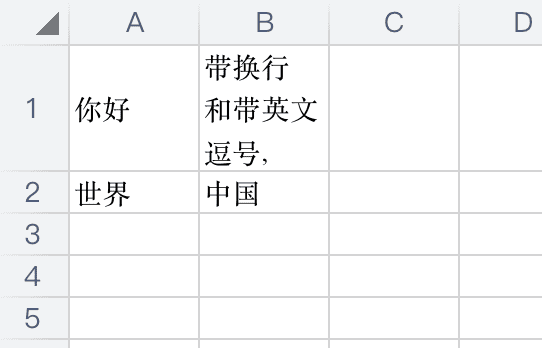
你好,"带换行
和带英文逗号,"
世界,中国
|
使用 WPS 打开文件:
示例2:指定文件编码
1
2
3
4
5
6
7
8
9
10
11
12
13
14
15
16
17
18
19
20
21
22
23
24
25
26
27
28
29
30
31
32
33
34
35
36
37
38
39
40
41
42
43
44
45
46
47
48
49
50
51
52
53
54
55
56
57
58
59
60
61
62
63
64
65
66
| package com.example;
import java.io.*;
import java.util.ArrayList;
import java.util.List;
import java.util.stream.Collectors;
import java.util.stream.Stream;
public class TestCsv {
public static String escapeSpecialCharacters(String data) {
String escapedData = data.replaceAll("\\R", " ");
if (data.contains(",") || data.contains("\"") || data.contains("'")) {
data = data.replace("\"", "\"\"");
escapedData = "\"" + data + "\"";
}
return escapedData;
}
public static String convertToCSV(String[] data) {
return Stream.of(data)
.map(TestCsv::escapeSpecialCharacters)
.collect(Collectors.joining(","));
}
public static void writeCsvFile(String filePath, List<String[]> dataLineList, String fileEncoding) {
try (BufferedWriter writer = new BufferedWriter(new OutputStreamWriter(new FileOutputStream(filePath), fileEncoding))) {
for (String[] dataLine : dataLineList) {
String s = convertToCSV(dataLine);
writer.write(s);
writer.newLine();
}
} catch (IOException e) {
e.printStackTrace();
}
}
public static void main(String[] args) {
List<String[]> dataLineList = new ArrayList<>();
dataLineList.add(new String[]
{ "你好", "带换行\n和带英文逗号," });
dataLineList.add(new String[]
{ "世界", "中国" });
writeCsvFile("/tmp/test1.csv", dataLineList, "GBK");
}
}
|
运行后,查看csv文件内容:
1
2
3
4
| $ cat /tmp/test1.csv
���,"����
�ʹ�Ӣ�Ķ���,"
����,�й�
|
使用 WPS 打开文件不会乱码,因为会自动识别文件编码:
